Jefferson Population Health
Jefferson Epic Population Health Messaging Overhaul
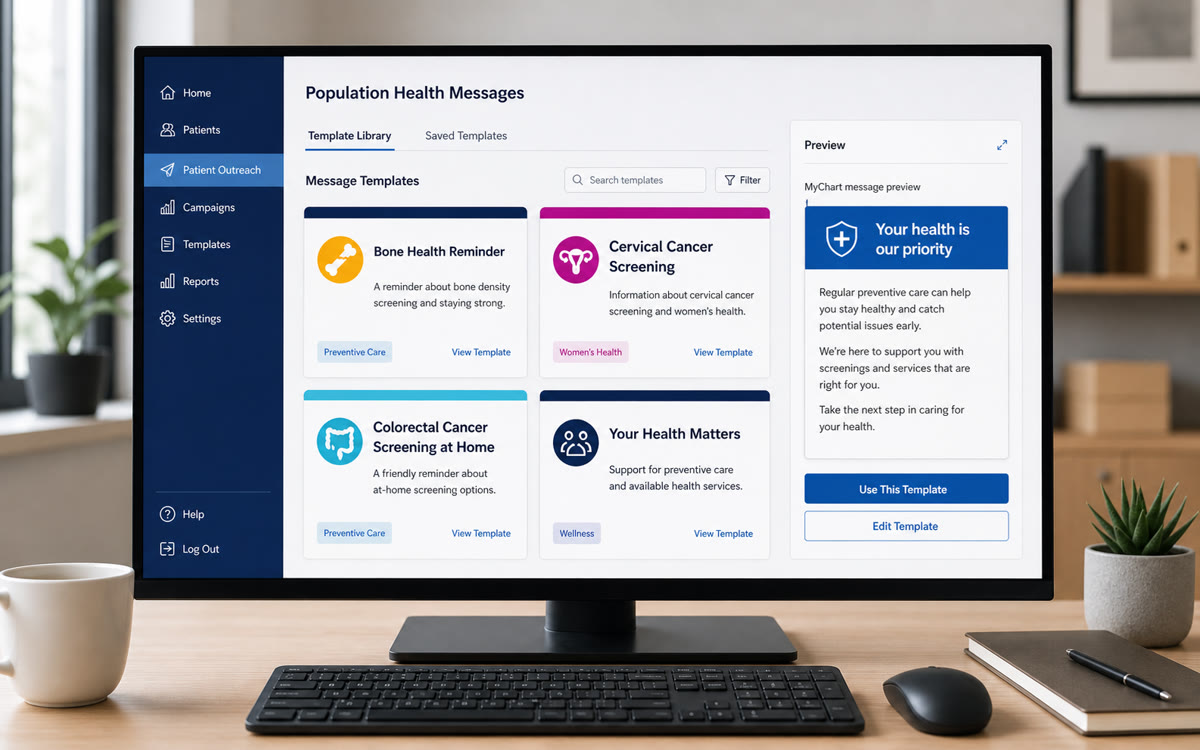
I built a Canva-to-Epic messaging library for preventive-care outreach across MyChart and letters, using colorful iconography, plain-language copy, Epic SmartPhrases, SmartTexts, and workqueues to make care-gap messages faster for staff and clearer for patients.
- Epic SmartPhrases
- Epic SmartTexts
- Epic MyChart
- Epic workqueues
- Canva
- population health
- Epic

Project note
In Brief
I built a Canva-to-Epic messaging library for preventive-care outreach across MyChart and letters, using colorful iconography, plain-language copy, Epic SmartPhrases, SmartTexts, and workqueues to make care-gap messages faster for staff and clearer for patients.
Relevant To
- population health leaders
- patient outreach teams
- healthcare communications and marketing teams
- Epic/MyChart operations teams
Search Context
- how to create healthcare education graphics in Canva
- how to use Canva graphics in Epic MyChart outreach
- healthcare patient education design standards
8 cited sources
Operating Context
Jefferson Population Health outreach depended on repeatable communication across multiple care-gap programs. The messages were important, but the workflow around them was manual: staff were writing, copying, pasting, and adapting outreach content across recurring preventive-care campaigns.
That created a predictable operating problem.
- Staff had to spend time recreating messages that should have been standardized.
- Patient-facing language and visual presentation could vary across programs.
- Outreach teams were not fully taking advantage of newer Epic messaging capabilities after Jefferson’s move to a newer Epic environment.
- Peer organizations were using more polished visual outreach designs, making Jefferson’s preventive-care communication an area for operational improvement.
Repeat outreach needed a more reliable production workflow for population health, with approved language, consistent visuals, and a staff path that could be reused across care gaps.
Constraint
The work had to fit inside the realities of a health-system communication environment.
- Templates needed to align with Jefferson marketing guidance.
- Outreach had to support multiple care-gap categories without becoming a fragmented library of one-off messages.
- Staff needed a faster workflow, not another deliverable that required manual rework.
- Spanish-language versions were needed for some outreach use cases, so the visual system could not depend on English-only interpretation of colors, icons, or layout.
- Response-rate improvement should remain qualitative unless measured internally or tied to a documented benchmark.
The constraint made the project a design-operations problem: standardize enough to improve speed and consistency, but keep messages usable for real outreach agents and program managers.
What We Built
I studied population health outreach design, reviewed Jefferson marketing guidelines, looked at public patient-education materials, and benchmarked how peer organizations were using more visual, more recognizable preventive-care messaging. I created the Canva templates from scratch while keeping the work grounded in Jefferson’s brand guidance and in public examples of healthcare education materials.
The design work focused on messages that patients could quickly understand and staff could reliably deploy:
- mammograms
- FIT / iFOBT colorectal screening
- diabetic eye exams
- hemoglobin A1C testing
- kidney health evaluation
- cervical cancer screening
- PCP visits
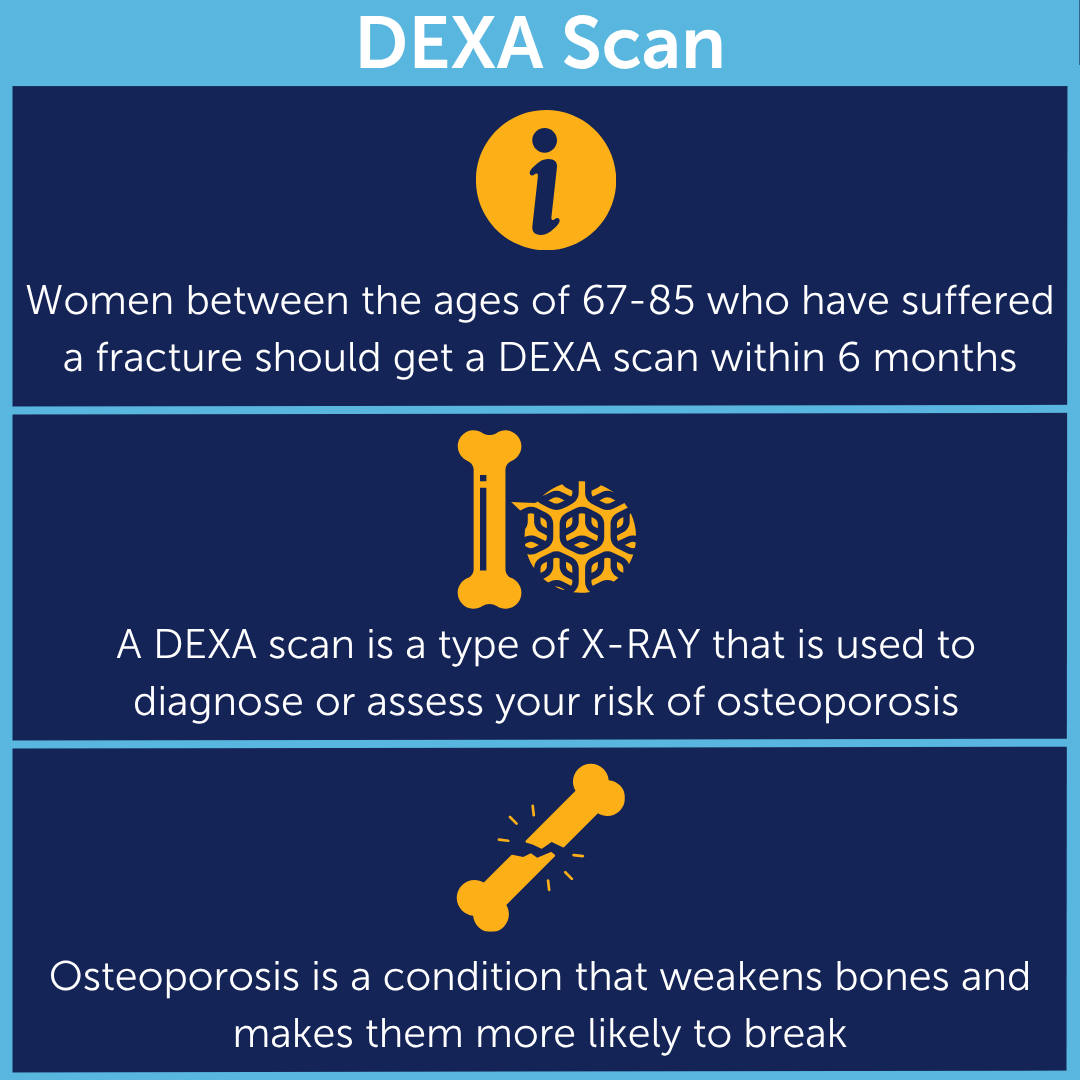
- DEXA scans
Some versions were created in Spanish. That mattered because the design system needed to work beyond English copy: simple iconography, clear visual hierarchy, and brand-consistent color did more work than I expected.
The source material supports an operating-improvement claim: better message design, more consistent delivery, and a standardized staff workflow. It does not support a quantified response-rate lift.
Workflow Implementation
I created roughly 25 care-gap message templates in Canva and operationalized them for Epic-based outreach.
The implementation converted a manual communication pattern into a standardized workflow:
- reusable templates replaced repeated manual writing and copy-paste work
- Jefferson-aligned visuals and language created a more consistent patient-facing surface
- Epic SmartPhrases and SmartTexts gave outreach staff faster access to approved messaging
- MyChart and letter outreach gave the templates patient-facing delivery channels
- Epic workqueues helped staff find the right outreach population and use the correct message path
- outreach agents, program managers, and related team members were trained or educated on using the new messaging approach
The practical implementation combined a content library, an Epic workflow improvement, and a staff enablement project.
The colorectal outreach redesign is the deeper modality-specific version of this work: FIT/iFOBT and Cologuard outreach tested how message design, mailed instructions, reminders, and completion metrics behaved inside one prevention program. The JHP knowledge pipeline applies the same source-of-truth discipline to Medicare Advantage plan materials.
Campaign Materials
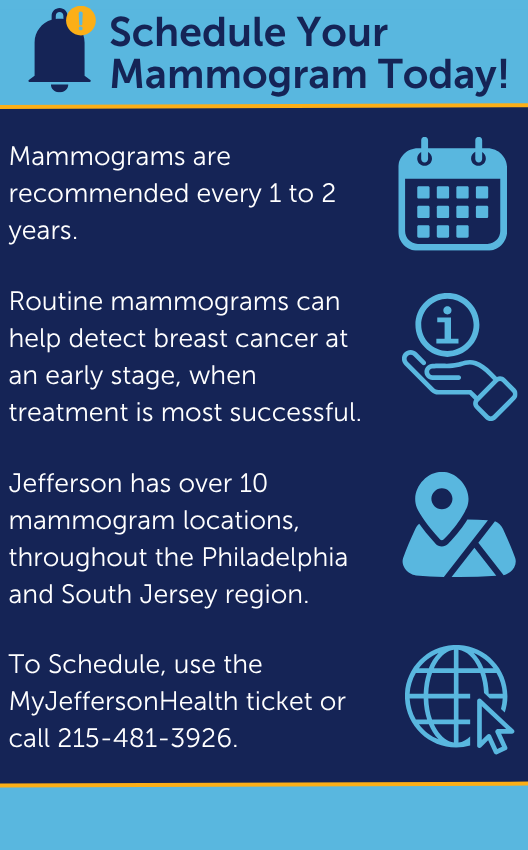
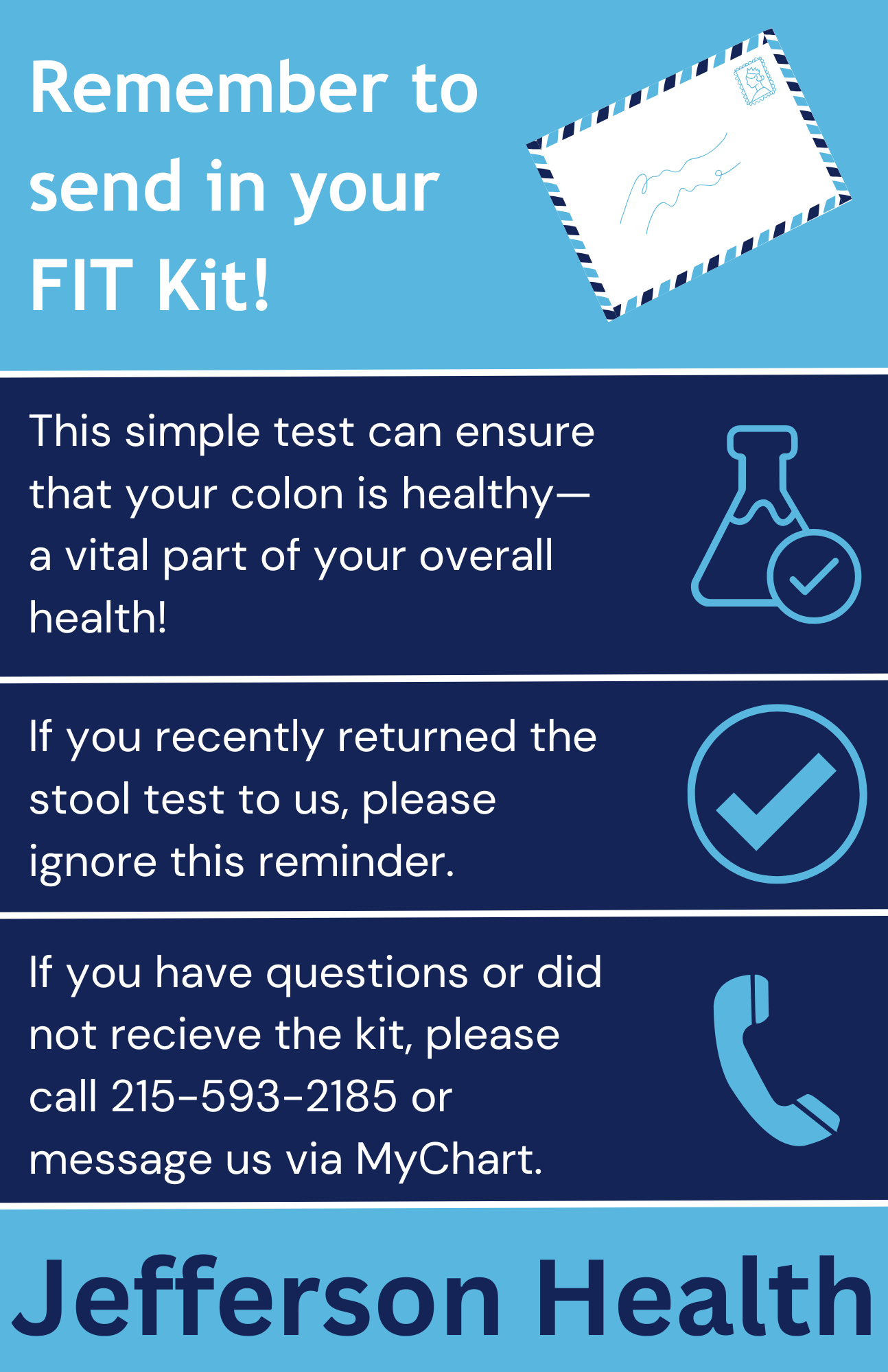
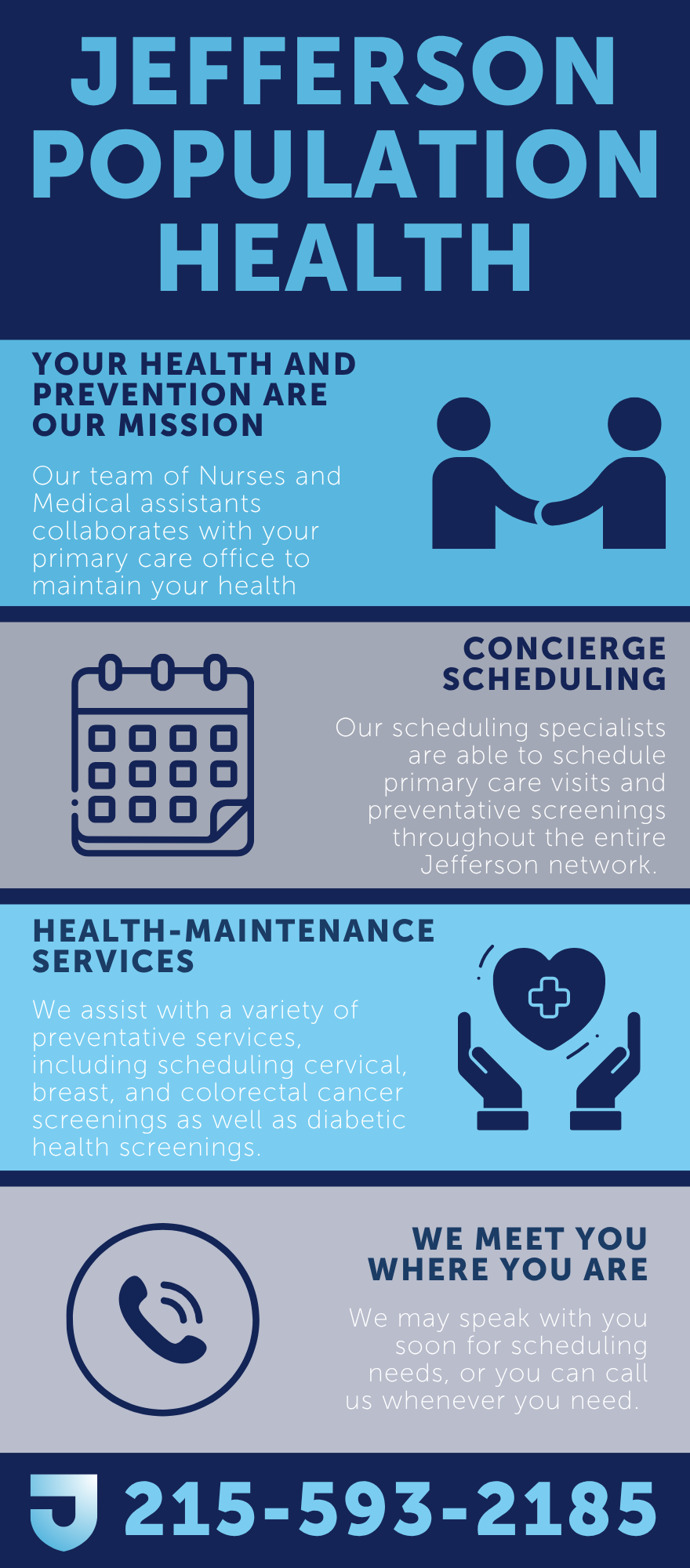
These graphics show the design system in practice: direct headlines, simple iconography, Jefferson-aligned blue tones, one primary action, and enough plain-language context for a patient to understand why the message matters. They were meant to support the MyChart or letter copy, not replace it.
Implementation Playbook
The practical method is to treat every patient-facing graphic as a small clinical operations product. It has an audience, a job to do, a delivery channel, a compliance context, and a staff workflow around it.
The working sequence I would use again:
- Define the care gap and the next patient action. A good outreach graphic should answer one question quickly: what should the patient do next? If the action is “schedule,” “complete a kit,” “call us,” or “review results,” that action belongs in the headline or first line.
- Write the message before opening Canva. CMS plain-language guidance and the CDC Clear Communication Index both push the same discipline: name the main message, state the behavior, remove clutter, and make the call to action easy to find.
- Aim for a practical reading level. For broad preventive-care outreach, I prefer short sentences, common words, active voice, and a structure that would be comfortable around a sixth- to eighth-grade reading level unless the audience or clinical content demands otherwise. The goal is lower friction when a message lands in a portal inbox, mobile notification, or email preview.
- Separate clinical accuracy from message complexity. Clinical teams should validate the content, but validation should not turn a short outreach asset into a brochure. If a detail is necessary for informed action, keep it. If it is defensive institutional language, move it out.
- Design for scanning. Use one dominant headline, one support sentence, and one action. Dense paragraphs, multiple competing badges, and decorative icons make the message harder to use.
- Build the Canva file as a reusable template system. Lock brand colors, type hierarchy, logo placement, spacing, and approved footer language. Leave only the care-gap-specific text and image/icon area editable for future campaigns.
- Package for Epic/MyChart delivery. Export at the dimensions and file types accepted by the organization’s portal-message workflow, keep file sizes reasonable, write matching plain-text message copy, and store the asset in a named template library so staff are not hunting through personal folders.
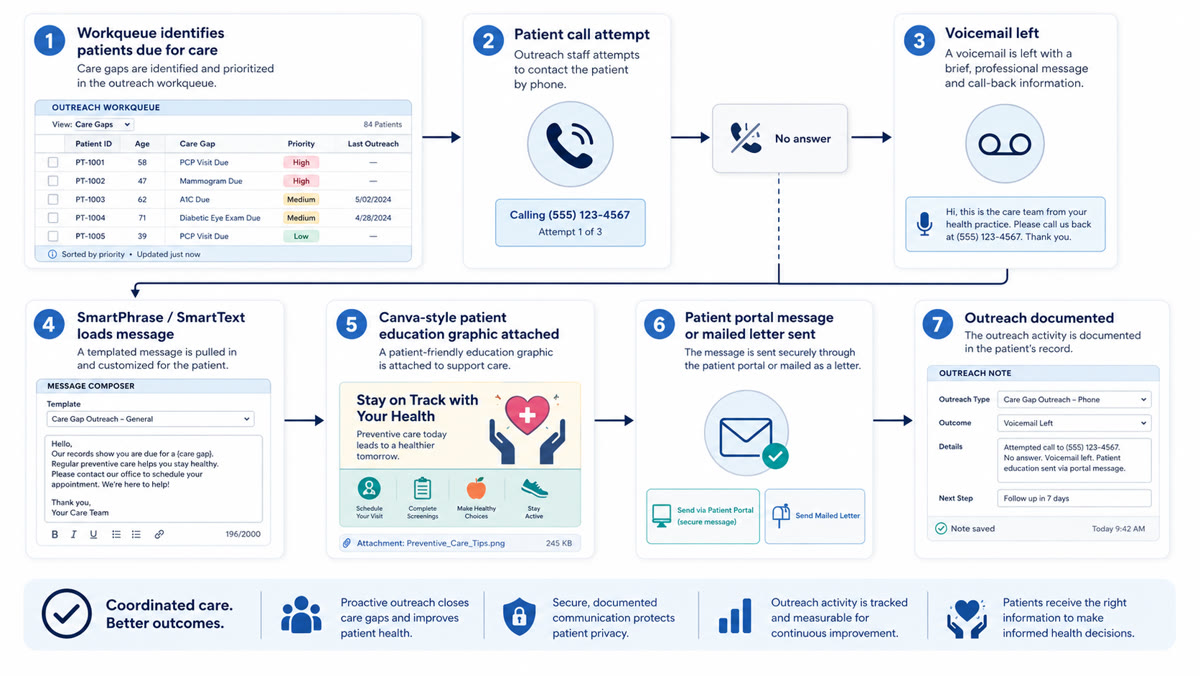
- Train the staff workflow. The repeatable path matters: open the relevant workqueue, identify the care gap, select the approved Canva-derived graphic, insert the SmartPhrase or SmartText message body, send through MyChart or letter workflow, and document the outreach consistently.
Reusable Checklist
I would use this operating checklist to recreate the workflow safely:
- Workqueue setup: Build or use an outreach workqueue that identifies patients by care gap, priority, and last outreach status.
- Call attempt: Call the patient before sending the written message when the campaign workflow calls for phone outreach.
- Voicemail path: If there is no answer, leave a brief professional voicemail with callback information and no unnecessary clinical detail.
- Message body: Use the approved SmartPhrase or SmartText so staff are not rewriting outreach language manually.
- Graphic attachment: Attach the correct Canva-style patient education graphic for the care gap, language, and campaign.
- Delivery channel: Send the message through MyChart when appropriate, or use the letter workflow when mailed outreach is the better channel.
- Documentation: Record the outreach attempt, outcome, details, and next step so the campaign remains measurable and follow-up is possible.
- Review loop: Periodically review template language, graphics, care-gap logic, and outreach outcomes so the library stays current.
Project material Canva to Epic/MyChart outreach checklist
A reusable checklist for turning preventive-care graphics into approved Epic/MyChart outreach workflows.
The workflow diagram gives the structure: workqueue, call, voicemail, message load, graphic attachment, portal or letter send, and documentation.
Standards, Governance, And Validation
Readability came first. Preventive-care outreach is usually competing with work, family, anxiety, low trust, low time, and variable health literacy. The design should lower the cognitive burden:
- Use one message per asset.
- Put the patient action above supporting detail.
- Prefer concrete verbs: schedule, complete, mail, bring, call, review.
- Avoid internal program names when a patient-facing phrase is clearer.
- Write alt text or adjacent message text so the graphic is not the only source of meaning.
Color needed to respect Jefferson brand guidance while staying accessible. WCAG is a useful baseline: do not rely on color alone, preserve contrast, and make sure important symbols or status cues have text support. In healthcare, color also carries cultural and clinical associations. Red may imply emergency or danger. Green may imply permission or completion. Yellow can signal warning. A palette can be on-brand and still mislead if it borrows clinical signal colors casually.
Symbols needed the same discipline. Icons that are obvious to designers are not always obvious across age groups, language groups, or cultural contexts. I prefer simple, literal symbols only when they reinforce nearby words: calendar for scheduling, envelope for mail, phone for calling, check mark for completion. For multilingual populations, the icon should support the translated text rather than replace it. HHS language-access guidance is the reason to treat translation, interpreter access, and visual communication as part of the same equity problem rather than separate compliance boxes.
Canva-To-Epic/MyChart Operating Guide
The workflow I would document for a population-health team:
- Create a Canva brand kit or locked template set with approved colors, fonts, logo treatment, and spacing.
- Make one master template per outreach pattern: screening reminder, kit return, appointment scheduling, overdue preventive visit, and post-outreach follow-up.
- Add a content checklist inside the design file or companion SOP: reading level, clear action, phone number/link, deadline if applicable, language version, owner, review date, and source guideline.
- Export each asset with predictable naming, for example
crc-fit-kit-return-en-v03.png. - Store the final asset in the organization’s approved shared location, not a personal Canva folder.
- Create the Epic SmartPhrase or approved portal message body that pairs with the graphic. The text version should stand alone because images may not load, may not be accessible, or may be separated from the message in some workflows.
- Test the message in the actual patient-facing channel before scaling. Check mobile display, desktop display, image cropping, link behavior, language rendering, and whether the call to action remains visible without scrolling.
- Assign governance. Someone owns updates when guidelines change, phone numbers move, screening ages change, branding changes, or the Epic build changes.
My opinion after doing this work: healthcare teams often underestimate the operational value of “small” patient-education assets. A template library is a reliability tool. It makes the right message faster to send, harder to accidentally degrade, and easier for patients to act on.
The surprising lesson was how much people responded to colorful iconography. I expected cleaner design to help. I did not expect the icons and color system to improve the feel of the work as much as they did. Patients and staff both need fast recognition, and a bright, consistent visual language made preventive-care outreach feel less like another generic administrative message.
Results And Evidence
The result I can support is operational consistency, not a measured response-rate lift.
- Roughly 25 care-gap message templates were created.
- The templates covered mammograms, FIT/iFOBT colorectal screening, diabetic eye exams, hemoglobin A1C, kidney health evaluation, cervical cancer screening, PCP visits, and DEXA scans.
- Outreach teams gained a faster way to send standardized, designed population health messages through MyChart and letters.
- The work improved consistency, speed, and brand alignment across care-gap outreach.
- Staff could rely less on manual message drafting and copy-paste workflows.
- A small number of Spanish-language versions supported language-access needs for selected outreach use cases.
The current source material does not support a measured response-rate improvement. It supports a more standardized delivery workflow that was easier to execute and more consistent for patients.
My Operating View
I care about this kind of healthcare operations work because quality often breaks down in the small repeated actions that determine whether patients receive clear, timely, recognizable communication.
Better healthcare systems often come from making the next correct action easier. In this case, that meant giving outreach staff a faster Epic-enabled messaging surface and giving patients clearer preventive-care communication across common care gaps.
For me, the project is a practical reminder that healthcare transformation also depends on the unglamorous infrastructure of templates, workflows, staff adoption, and message design.
References
ONC and AHRQ sources support the broader context that patient portals and digital health information access are now mainstream healthcare infrastructure. They are context sources, not Jefferson-specific response-rate evidence.
The project evidence is the template library, care-gap coverage, MyChart and letter deployment, workflow standardization, Spanish-language variants, and staff enablement. Response-rate lift is left out unless a reputable source or Jefferson measurement is added.
Frequently Asked Questions
- How do you create healthcare education graphics in Canva?
- Start with the care gap and the patient action, write plain-language copy before designing, lock the organization's brand colors and typography, design for scanning, check accessibility and language access, then export a reusable asset paired with plain-text portal message copy.
- How should Canva graphics be used in Epic MyChart outreach?
- The graphic should support an approved portal message, not replace it. Store the final asset in an approved shared location, pair it with an Epic SmartPhrase or SmartText message body, route it through the relevant MyChart and workqueue workflow, test mobile and desktop display, and assign ownership for future clinical, branding, or workflow updates.
- What makes a healthcare outreach graphic accessible?
- Accessible outreach graphics use readable language, sufficient contrast, text labels instead of color-only meaning, simple symbols that support nearby words, alt text or equivalent message text, and translated or language-access-aware versions when needed.
Cited Sources
- Toolkit for Making Written Material Clear and Effective Centers for Medicare & Medicaid Services
Plain-language and health-literacy guidance for written healthcare materials, including audience fit, organization, and usability testing.
- CDC Clear Communication Index Centers for Disease Control and Prevention
Practical scoring framework for public-health materials, including main message, call to action, behavioral framing, and visual support.
- How to Write Easy-to-Read Health Materials National Library of Medicine
Patient-education guidance for simpler language, short sentences, active voice, readable layout, and audience-centered examples.
- Individuals' Access and Use of Patient Portals and Smartphone Health Apps, 2022 Office of the National Coordinator for Health Information Technology
National context for rising patient use of online records, portals, and app-mediated access to health information.
- Electronic Patient Portals Agency for Healthcare Research and Quality
Context for portals as care-communication infrastructure that can support appointments, test results, prescription requests, clinician communication, and record access.
- Web Content Accessibility Guidelines 2.2 World Wide Web Consortium
Accessibility reference for color contrast, non-text content, readable structure, and not relying on color alone to convey meaning.
- Limited English Proficiency U.S. Department of Health and Human Services
Language-access context for federally assisted healthcare organizations communicating with patients who have limited English proficiency.
- Canva Accessibility Canva
Design-platform reference for accessibility features and practical constraints when producing patient-facing graphics.