Jefferson Health Plans
Jefferson JHP EOC/ANOC Knowledge Pipeline
I built a governed Medicare Advantage plan-material assistant for Jefferson Health Plans using Microsoft Copilot Studio, Teams, SharePoint, PowerApps, Python, and GPT-4o. It helped Outreach and Product teams retrieve EOC, ANOC, and benefit-change answers from approved source documents instead of scattered PDFs and memory.
- Microsoft Copilot Studio
- PowerApps
- Microsoft Teams
- SharePoint
- GPT-4o
- Medicare Advantage
- Medicare Stars



Project note
In Brief
I built a governed Medicare Advantage plan-material assistant for Jefferson Health Plans using Microsoft Copilot Studio, Teams, SharePoint, PowerApps, Python, and GPT-4o. It helped Outreach and Product teams retrieve EOC, ANOC, and benefit-change answers from approved source documents instead of scattered PDFs and memory.
Relevant To
- Medicare Advantage operations leaders
- Stars and member experience teams
- healthcare AI builders
- benefit and product operations teams
- Microsoft Power Platform builders in healthcare
Search Context
- how to validate AI-generated plan benefit answers
- how to build a Medicare Advantage EOC ANOC knowledge assistant
- Microsoft Copilot Studio Medicare Advantage plan documents
- PowerApps Medicare Stars workflow
- governed healthcare AI source of truth workflow
10 cited sources
Operating Context
Medicare Advantage plans run on dense, annual, highly governed documents. Evidence of Coverage, Annual Notice of Change, Summary of Benefits, formularies, riders, and plan amendments describe what members can use, what changed, what costs apply, and what language teams should rely on when answering benefit questions.
Jefferson Health Plans had the same problem many plans have: the correct information existed, but it lived inside long PDFs, annual document sets, personal notes, product-team memory, and department-specific folders. For member-service, outreach, product, and Medicare Stars work, staff needed quick access to the right approved language for the right product, plan year, and benefit context.
The work was Stars-relevant because inconsistent answers, confusing benefit explanations, unresolved medication-change questions, and slow service recovery can create member friction. The assistant supported the operating system around Stars: faster lookup, more consistent answers, source traceability, and a cleaner path from approved plan materials to staff-facing response.
What We Built
I built a governed Medicare Advantage knowledge pipeline for Jefferson Health Plans using Microsoft Copilot Studio, Microsoft Teams, SharePoint, PowerApps, Python, and GPT-4o. I reported to the Vice President of Medicare Stars and the Chief Product Officer, and the work was one of my Green Belt projects in Jefferson Health Plans’ Six Sigma training program through Villanova and the Project Management Office.
The system processed more than 5,000 pages of plan material and turned a scattered annual document problem into a structured, searchable operating layer for Outreach and Product. It was piloted and then used by the Outreach team; I left Jefferson after the pilot period, so public usage claims should stay conservative unless a later adoption count is approved.
The built system included:
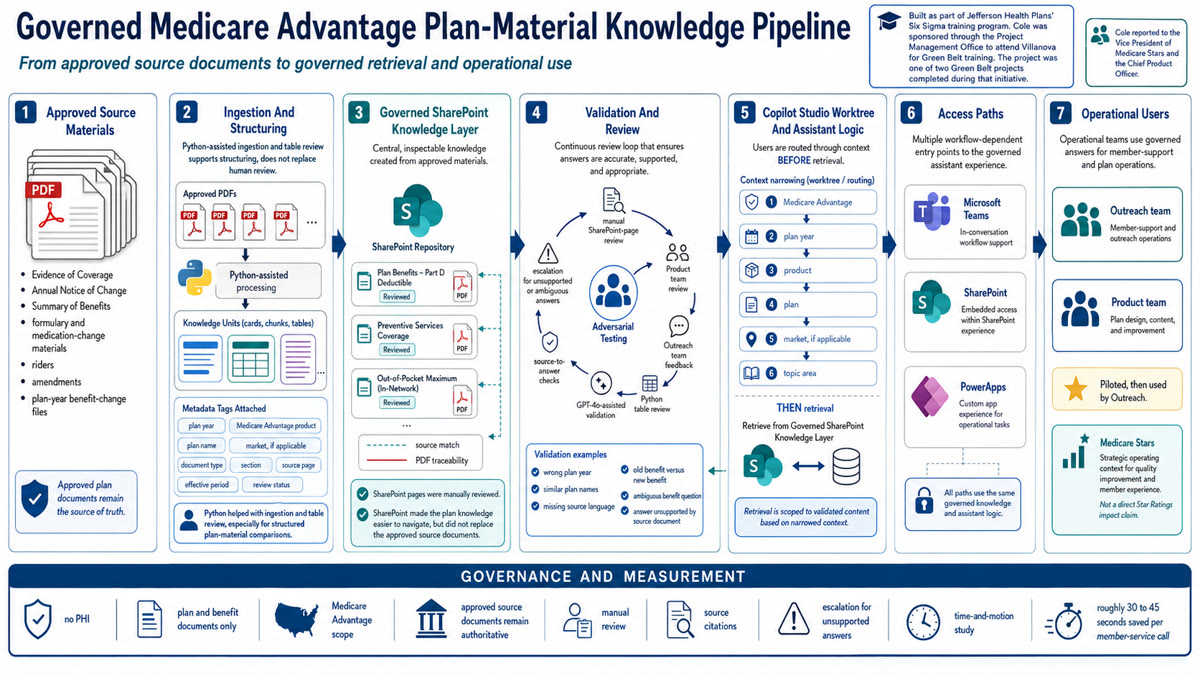
- a Copilot Studio worktree that routed users through the correct Medicare Advantage product, plan, plan year, and topic context
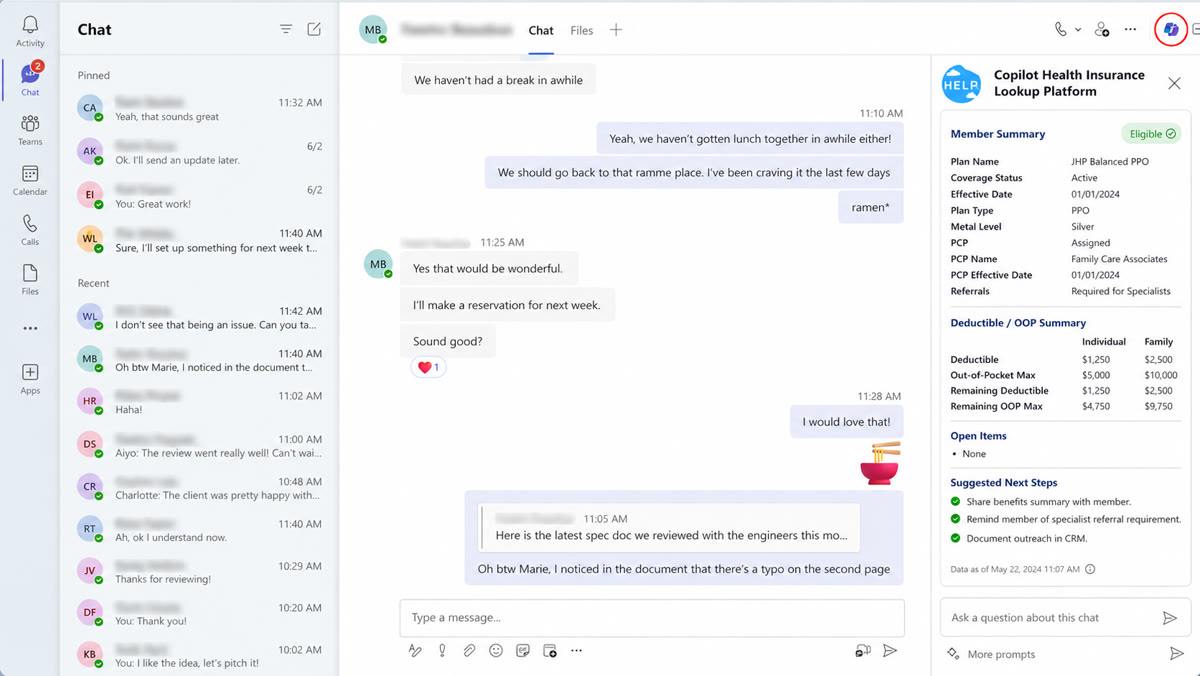
- multiple access paths through Microsoft Teams, SharePoint, and PowerApps
- SharePoint-backed knowledge pages created from approved EOC, ANOC, Summary of Benefits, and related plan materials
- Python ingestion logic for turning PDFs into a more navigable SharePoint structure
- Python review support for tables and structured comparisons
- deterministic SharePoint-to-PDF matching so generated knowledge could be traced back to source material
- GPT-4o-assisted validation to accelerate review of extracted and restructured content
- a year-over-year benefit-change workflow to reduce dependence on memory, personal notes, and informal comparison files
The authority model was explicit: the plan document remained the source of truth. The assistant handled navigation, retrieval, citation, and validation. That distinction is what made the project more serious than a chatbot.
Why Copilot Studio, SharePoint, Teams, And PowerApps Fit The Problem
The Microsoft stack fit because Jefferson teams already worked inside Microsoft 365, Teams, and SharePoint. The goal was to put governed plan knowledge where the work already happened.
Copilot Studio handled the worktree and agent logic. It gave the experience a controlled decision path: route the user by program, product, plan, year, and topic before asking the assistant to retrieve anything. That matters in Medicare Advantage because similar plan names, year-over-year changes, and product variations can produce wrong answers if retrieval starts too broadly.
Teams, SharePoint, and PowerApps were access paths into the same operating model. Users could reach the assistant in Teams, work from SharePoint, or use PowerApps as one method for interacting with the workflow. SharePoint gave the project an inspectable knowledge layer with permissions, page structure, and source traceability.
GPT-4o helped accelerate validation and retrieval inside a constrained workflow. Python was especially useful for reviewing tables and structured plan-material comparisons. The architecture depended on source-control design, the Copilot Studio worktree, metadata, manual review, and governance.
| Layer | Tooling | What It Did | Why It Mattered |
|---|---|---|---|
| Source authority | Approved plan PDFs | Preserved EOC, ANOC, Summary of Benefits, and related materials as the final authority | Prevented the assistant from becoming the legal or compliance source of truth. |
| Knowledge layer | SharePoint | Converted dense PDFs into structured, searchable pages with document context | Made plan knowledge inspectable and easier to maintain. |
| Routing layer | Copilot Studio worktree | Guided staff into the right product, plan year, and topic before retrieval | Reduced wrong-answer risk before AI was involved. |
| Access layer | Teams, SharePoint, and PowerApps | Gave Outreach and Product multiple ways to reach the same governed knowledge layer | Improved usability without forcing a single tool habit. |
| Automation layer | Python and GPT-4o | Accelerated ingestion, table review, matching, and validation | Saved manual effort while keeping review and traceability intact. |
Architecture Image
Implementation Playbook
The reusable lesson is that healthcare AI should start with source governance before model selection. If the documents are unmanaged, AI only makes the confusion faster.
The implementation pattern I would reuse:
- Inventory every source document. Capture document type, plan year, product, market, owner, approval status, effective period, version, and source location.
- Separate authority from usability. Keep the approved PDF authoritative, but build a more usable knowledge layer that points back to the source.
- Define the routing tree before retrieval. Decide what the user must select before asking a question: Medicare Advantage product, plan, plan year, market, topic, or benefit category.
- Break PDFs by operating use. Do not split only by page count. Split around benefits, cost sharing, drug changes, prior authorization language, exclusions, member-facing language, and change notices.
- Add metadata to every knowledge unit. The minimum useful metadata is plan year, product, plan, document type, page or section, effective date, source owner, and review status.
- Build citation behavior into the experience. Staff should be able to verify the answer against a source page while they are still in the workflow.
- Validate with adversarial questions. Test similar plan names, old-year benefits, changed benefits, missing topics, drug-change scenarios, ambiguous member language, and questions where the correct response is escalation.
- Keep PHI out if the task does not need PHI. This use case was plan-material retrieval. It did not require patient-specific data.
- Create an annual refresh process. EOC and ANOC work repeats. The pipeline needs a plan-year calendar, ownership model, and change-control process.
- Track operational performance. Measure lookup time, answer confidence, citation quality, escalation rate, source defects, and staff feedback before making broader impact claims.
Standards, Governance, And Validation
The validation standard was source fidelity: could a staff member get the right answer, for the right plan, from the right approved document, with a path back to the source. That is a stricter and more useful standard than asking whether the assistant sounded fluent.
The governance model included:
- no PHI in the knowledge base
- plan and benefit documents only
- manual SharePoint-page review before operational use
- Product-team review and Outreach-team feedback before broader use
- deterministic SharePoint-to-PDF matching
- Python review support for tables and structured source comparisons
- GPT-4o-assisted validation that accelerated review but did not replace it
- audit trails and source links so the system could be inspected
- explicit escalation when the source was ambiguous, missing, or plan-specific
NIST’s AI Risk Management Framework is useful here because it keeps attention on validity, reliability, transparency, accountability, and monitoring. Microsoft Copilot Studio’s own governance model also matters because healthcare teams need permissions, data controls, environment controls, and source management before they scale assistants.
The most important validation questions were:
- Is this document final and approved for the plan year?
- Does this answer cite the correct product, plan, and source document?
- Does the answer distinguish current-year benefits from prior-year benefits?
- Does the answer preserve CMS-appropriate and member-facing language?
- Can a staff member verify the answer without leaving the workflow?
- Does the assistant decline or escalate when the source material does not support an answer?
Results And Evidence
The clearest supported result is operational consistency. The project turned more than 5,000 pages of plan material into a governed knowledge pipeline and created a collective year-over-year change process where teams had previously relied on memory, personal notes, and scattered PDF versions.
Project metrics record:
- more than 5,000 pages of plan material processed
- no PHI involved
- plan and benefit documents only
- pilot use by Outreach and Product, followed by use by the Outreach team
- 37.5 seconds saved per member-service call, using the midpoint of the measured 30 to 45 second range from a time-and-motion study
- a repeatable source-of-truth and year-over-year benefit-change process
The supported impact is that the assistant helped Stars-relevant work by improving access to governed plan knowledge, reducing lookup friction, and making benefit answers easier to verify.
Reusable Checklist
For a Medicare Advantage plan-material assistant, the practical build checklist is:
- List every EOC, ANOC, Summary of Benefits, formulary, rider, amendment, and plan-specific source.
- Mark which documents are final, draft, expired, superseded, or pending approval.
- Assign metadata before ingestion: plan year, product, market, plan, document type, source owner, version, and effective period.
- Decide which questions the assistant is allowed to answer and which questions require escalation.
- Build a Copilot Studio worktree, PowerApps screen, or equivalent routing path before retrieval.
- Create SharePoint pages or another inspectable knowledge layer that maps back to the source PDFs.
- Use Copilot Studio or another assistant layer only after the source structure is clean.
- Test against real benefit questions, medication-change questions, year-over-year change questions, and similar-plan-name traps.
- Require citations or source links for operational answers.
- Review outputs with Product, Outreach, compliance, Stars, and service leaders before broad release.
- Measure lookup time, source defects, answer correction rate, escalation rate, and staff usability.
- Rebuild the refresh calendar before the next plan year starts.
Project material Medicare Advantage plan-material assistant validation workbook
A reusable workbook for source inventory, metadata schema, adversarial testing, and annual refresh.
Project material JHP knowledge pipeline architecture description
A diagram brief for showing approved plan documents, SharePoint knowledge, validation, Copilot Studio routing, and operational access paths.
My Operating View
This project shows how I think about healthcare AI. The core work was designing an operating system around source authority, Microsoft tooling, plan-year logic, benefit-change governance, and Medicare Stars workflows. GPT-4o summarization mattered after that operating model existed.
Healthcare has many document problems that get mislabeled as AI problems. The hard part is knowing which document is final, which plan it belongs to, whether the language changed this year, who approved it, and whether the person answering a member can defend the answer. Once that structure exists, AI becomes genuinely useful.
My view is that Copilot Studio, SharePoint, Teams, and PowerApps are most useful in healthcare when they are used as workflow infrastructure. Copilot Studio can force the right context through a worktree. SharePoint can hold governed knowledge. Teams can put the assistant where work happens. PowerApps can provide another controlled access path. GPT-4o can accelerate extraction and validation. The system only works if a human-designed authority model sits underneath it.
That is also why this connects to Medicare Stars. Stars work includes the operating discipline around member experience, complaints, service consistency, medication changes, benefit understanding, and organizational follow-through. A governed knowledge assistant gives Stars teams practical infrastructure when plan complexity grows.
The same pattern runs through the governed-document work here. The Epic/MyChart messaging overhaul made approved patient outreach easier to use. The colorectal screening redesign made completion and cadence the real operating standard. This project made approved plan language the source of truth before AI ever entered the workflow.
References
CMS and Medicare.gov sources establish that EOC and ANOC materials are official, recurring Medicare plan documents and that plan changes and member-facing benefit information are operationally important. CMS Part C and D performance sources support the broader relevance of member experience, complaints, customer service, and plan performance measurement in Medicare Advantage and Part D.
Microsoft Learn sources support the technical design pattern: Copilot Studio for agent experiences and SharePoint knowledge sources, PowerApps for custom workflow apps, and Microsoft 365 / Power Platform governance controls for security and data management.
NIST’s AI Risk Management Framework supports the governance model: source validity, reliability, transparency, accountability, and monitoring. Page volume, estimated call-time savings, Six Sigma success status, and Jefferson team usage stay out of the public claim set until approved for publication.
Frequently Asked Questions
- How do you validate AI-generated plan benefit answers?
- Keep approved plan documents authoritative, tag every source by plan year, product, market, document type, and page, route users to the correct plan before retrieval, require citations, test adversarial benefit questions, and keep human review and escalation paths in the workflow.
- How can Medicare Advantage teams use Microsoft Copilot Studio safely?
- Use Copilot Studio as an access and retrieval layer over governed knowledge sources such as SharePoint. Limit the data surface, avoid PHI when the use case does not require it, enforce permissions, preserve citations, and define what the assistant may not answer.
- How does a plan-material assistant support Medicare Stars work?
- The assistant does not directly improve Star Ratings by itself. It supports Stars-relevant operations by helping teams answer benefit, change, medication, and plan questions consistently, reducing lookup friction and lowering the risk of avoidable confusion or complaints.
- What is the source of truth in a Medicare Advantage knowledge assistant?
- The approved plan document remains the source of truth. The assistant is a navigation, retrieval, citation, and validation layer that helps staff find the right document language faster.
Cited Sources
- AI Risk Management Framework National Institute of Standards and Technology
Governance reference for validity, reliability, transparency, monitoring, and human accountability in AI-supported workflows.
- Evidence of Coverage Medicare.gov
Official beneficiary-facing explanation that Medicare plans send Evidence of Coverage documents each year and that these documents describe coverage and costs.
- Marketing Models, Standard Documents, and Educational Material Centers for Medicare & Medicaid Services
CMS model-materials page for Medicare Advantage and Part D standardized materials, including ANOC and EOC templates and instructions.
- MA Plan Benefit Changes Centers for Medicare & Medicaid Services
CMS Medicare education page describing Annual Notice of Change and Evidence of Coverage documents in Medicare Advantage.
- Part C and D Performance Data Centers for Medicare & Medicaid Services
CMS performance data page for Medicare Advantage and Part D programs, including Star Ratings data tables, measures, fact sheets, and technical notes.
- 2025 Medicare Advantage and Part D Star Ratings Centers for Medicare & Medicaid Services
Context for member experience, complaints, customer service, and plan performance measurement.
- Medicare Communications and Marketing Guidelines Centers for Medicare & Medicaid Services
Compliance context for Medicare Advantage and Part D communications, marketing, and beneficiary-facing material.
- Add SharePoint as a knowledge source Microsoft Learn
Microsoft Copilot Studio documentation for adding SharePoint URLs or lists as knowledge sources for an agent.
- Security and governance in Microsoft Copilot Studio Microsoft Learn
Microsoft guidance on using Power Platform and Microsoft 365 security and governance controls for agents built with Copilot Studio.
- What is Power Apps? Microsoft Learn
Microsoft overview describing Power Apps as a low-code app platform for turning manual business operations into digital processes connected to sources such as SharePoint and Microsoft 365.